
One Tap Away
CSC ServiceWorksLifestyle
4.6941.00 Reviews
- Version
- 2.1.45
- Installs
- 100.00K
- Age Rating
- Everyone
Screenshots
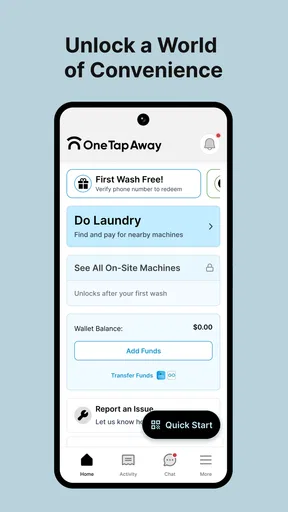
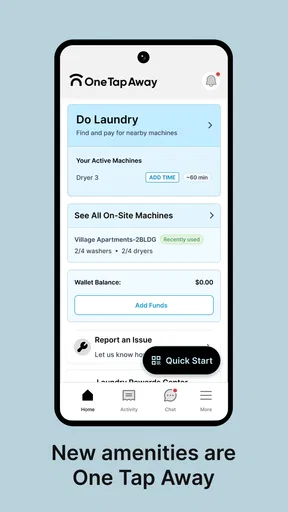
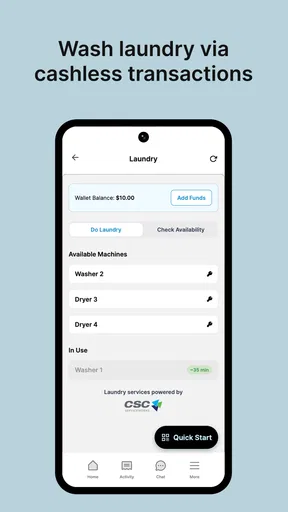
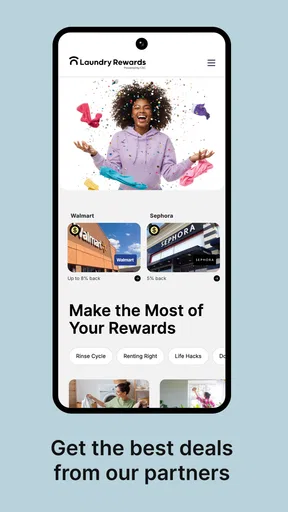
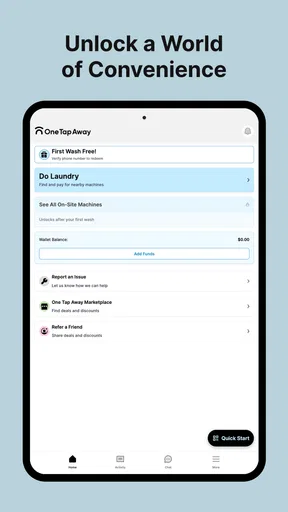
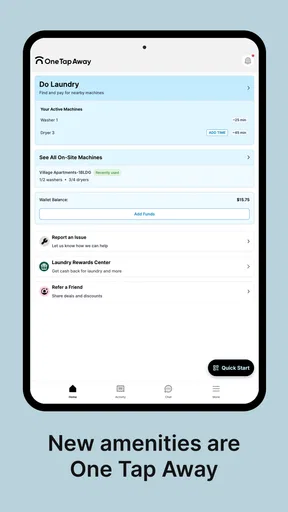
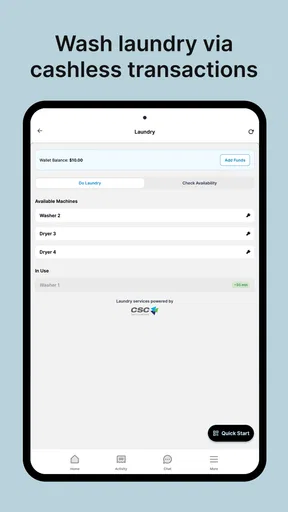

Our Review of One Tap Away
 Analysis by Appyee
I approached One Tap Away as a practical laundry companion rather than another app I would open every day. Its purpose is straightforward: it brings CSC laundry services into a mobile experience, which can make a shared laundry room less awkward when you are trying to get a load started, keep track of what is happening, or deal with the small decisions that usually interrupt the chore. The app is free, aimed at Everyone, and comes from CSC ServiceWorks, so it is clearly designed for ordinary household use rather than technical users.
My first impression was that the app makes most sense when I am already standing near a supported laundry setup. This is not a general household organizer, a shopping app, or a replacement for a washing machine. Its value depends on the laundry environment around me and on whether that environment works with CSC’s service. When those pieces line up, the phone becomes a useful control point. When they do not, there is little reason to keep opening it.
What to expect before you begin
The app sits in the lifestyle category, but that label hides its very specific job. I would think of it as a bridge between a physical laundry room and my phone. Instead of treating the machine as an isolated appliance, the app gives me a digital way to interact with the service connected to it. That can be especially helpful in an apartment building, residence hall, shared housing, or another place where laundry equipment is not inside my own home.
The most important expectation to set is that this is a location-dependent tool. I would not install it expecting a complete laundry tutorial or a universal remote control for any washer and dryer. The useful experience begins when I can identify the relevant laundry area or machine and follow the available flow. If I am preparing for a move, checking whether a building uses CSC ServiceWorks would be more useful than downloading the app simply because the name sounds convenient.
Its public reception is encouraging: the app holds an average rating of 4.6 from roughly 6,100 ratings. That does not guarantee that every laundry room will feel equally smooth, because the physical equipment and local setup still matter, but it suggests that the basic idea is working for many people. I also noticed that the app has passed the early experimental stage. It was released on September 23, 2024, and its current version is 2.1.45, which gives first-time users a reasonably current starting point.
CSC ServiceWorks has positioned this as a “one tap” experience, but I would interpret that as a goal rather than a promise that every task literally takes one tap. I still need to pay attention to the machine, choose the correct action, and make sure the physical load is ready. The app can reduce friction around the service; it cannot sort clothes, add detergent, close a door, or solve a machine that is physically unavailable.
Who gets the most value from it
I think the strongest audience is someone who regularly uses shared laundry equipment and wants fewer moments of uncertainty. A student moving between a dorm and a laundry room, a renter in a large apartment building, or a household member who often handles laundry away from home can all benefit from having the service in one place. The convenience becomes more noticeable when I repeat the same laundry routine several times a month.
It is also useful for people who dislike carrying extra cards, coins, or notes around. A phone-based process can make the chore feel more organized, particularly when I am already carrying a basket and detergent. That said, I would not choose this app as my only plan if I am dealing with an unfamiliar building and cannot confirm that its machines are supported. A physical payment method or the building’s own instructions may still be important as a backup.
Someone who owns a private washer and dryer probably has little reason to use it. The same is true for a person who visits a laundromat that does not use CSC ServiceWorks. In those situations, a standard payment method, the laundromat’s own app, or no app at all may be simpler. The narrow focus is a strength for the right user, but it is also the clearest reason to skip the download when the surrounding equipment does not match.
Setting up the app without making the first visit harder
I recommend installing it before I arrive with a full basket of clothes. The first laundry trip is a poor time to discover that I need to pause, read instructions, or work out which machine belongs to which service. Opening the app at home lets me become familiar with its layout while there is no pressure to start a wash immediately.
The app supports Android devices running version 7.0 or later, so compatibility is broad enough for many older phones. I would still keep the phone charged before entering the laundry room. That sounds obvious, but a payment or machine-related task is exactly the sort of situation where a nearly empty battery becomes an avoidable problem. The app is free to install, although that should not be confused with the cost of using a particular laundry machine or the rules set by the building.
During setup, I would move slowly through each screen and read the labels around the selected laundry location. Shared laundry rooms often contain several machines that look alike, and choosing the wrong one is a more realistic mistake than failing to understand the general concept. I find it helpful to compare the machine’s physical identifier with what the app shows before continuing. That small pause is one of the best ways to avoid starting the wrong cycle.
I would also keep the building’s laundry instructions nearby on the first visit. The app is a service layer, not necessarily a replacement for every local notice. A property may have its own guidance about machine availability, acceptable loads, operating hours, or what to do when equipment needs attention. If the app and a posted instruction appear to disagree, I would follow the clear local direction and avoid guessing.
The first successful action
For a first attempt, I would choose a small, ordinary load rather than the week’s entire laundry. My goal would be to learn the sequence with low stakes: identify the right laundry area, match the physical machine, prepare the clothes and detergent, and then use the app at the point where its service is needed. A smaller load makes it easier to notice whether I have selected the correct machine and whether the process feels complete.
I would not walk away immediately after tapping through the first screen. I would check the machine itself, listen for the expected start, and confirm that the physical action matches what I intended. This is an important distinction with any app connected to equipment: a successful screen transition is not always the same thing as a successful wash. The best habit is to verify both sides before leaving the room.
That verification also helps with a common shared-laundry problem: confusing a machine that is available with one that is merely empty. An empty drum may belong to a cycle that has ended, a machine waiting for attention, or equipment that is not ready for use. I would use the app’s displayed context together with the machine’s real-world state instead of relying on appearance alone.
Once the first action works, I would repeat the same routine on the next visit rather than exploring every option at once. Familiarity is more valuable here than discovering hidden complexity. After two or three successful uses, the app should become a short checkpoint in the laundry process instead of another chore layered on top of it.
A realistic laundry-room routine
Imagine I live in a building where the laundry room is on another floor. I bring one basket, separate the load before leaving my apartment, and open the app as I approach the machines. I identify the location, compare the machine information with the label in front of me, and prepare the load before using the phone. If everything matches, I complete the relevant action, watch the machine begin, and only then return upstairs.
That routine sounds modest, but it removes several small sources of hesitation. I am not standing in front of identical machines trying to remember which one I selected. I am not discovering halfway through the process that I chose the wrong location. I am also less likely to rush because the load is already sorted and the app is being used for one clear task rather than as a place to improvise.
For a busy household, the useful change is not necessarily speed. It is predictability. I can make the laundry trip more deliberate, and that matters when I am working around school, shifts, children, or limited access to shared equipment. The app does not make the physical chore disappear, but it can make the service interaction less scattered.
Where first-time users may get confused
The biggest source of confusion is likely to be the boundary between the app and the laundry room. I would not expect the app to know every detail about a building’s rules or to correct a machine that has a physical problem. If a door will not close, the drum is blocked, or the machine looks damaged, I would stop rather than repeatedly tapping through the app. Digital confirmation cannot make unsafe or unavailable equipment usable.
Another easy mistake is selecting a nearby location that is not the one I am actually using. In a dense apartment complex or campus, several laundry areas may appear similar. I would treat the location step as a matching task, not a formality. Look at the room name, machine label, and physical surroundings together. This is a more reliable workflow than choosing the first familiar-looking option.
I would also avoid assuming that a completed app action means I can leave without checking the machine. Shared equipment creates unusual edge cases: another person may have moved a load, a machine may have become unavailable, or I may have selected a neighboring unit. A quick physical confirmation is not wasted time; it is part of using the app responsibly.
Notifications and phone behavior can create another layer of uncertainty. If I am expecting the app to help me remember a laundry task, I would make sure I understand what the app actually displays during use and keep an eye on the machine’s own cycle information. I would not build an important schedule around an assumption that the phone will handle every reminder automatically. For a first visit, staying close enough to check the equipment is the safer approach.
There is also a practical social issue. In a shared room, another resident may be waiting for a machine or may not understand what I am doing with my phone. I would avoid blocking the equipment while reading screens, and I would double-check the machine before starting anything. The app is meant to streamline the interaction, not remove the need for ordinary laundry-room courtesy.
How it compares with usual alternatives
The traditional alternative is to follow the instructions posted in the laundry room and use whatever payment or operating method the building provides. That approach can be perfectly adequate when the machines are familiar and the process is simple. Its advantage is that it does not require learning another app. Its weakness is that it may leave me with less digital context when several machines or locations look alike.
A building-specific laundry app may offer a more tailored experience if the property provides one. That option could be better when it combines laundry with building notices or resident support. On the other hand, a service-specific app such as this one can be more useful when I move between supported locations that use the same provider. The trade-off is that its usefulness follows the CSC ServiceWorks ecosystem rather than my entire housing situation.
Cash, cards, or a physical laundry card remain sensible alternatives for anyone who prefers not to use a phone during a chore. They can also be valuable when my battery is low or when I am helping someone who does not want to create a digital routine. I would not frame the app as a universal replacement for those methods. Its best role is as an additional practical option for people who already use compatible shared laundry equipment.
Compared with doing everything manually, the app’s advantage is consistency. I can make the machine-selection step more deliberate and keep the service interaction in one place. Compared with a broader household-management app, its advantage is focus: it does not ask me to organize unrelated tasks. That focus is exactly why it feels useful in the laundry room and unnecessary everywhere else.
Small habits that make the experience smoother
My first tip is to prepare the load before opening the app. Sorting clothes, measuring detergent, and checking pockets while standing beside a machine makes the digital part feel longer and increases the chance of selecting the wrong equipment. When the physical work is ready, the app can stay focused on the service step it is actually good at.
My second tip is to use the machine label as a confirmation point every time, even after I become familiar with the room. Shared equipment can be rearranged, replaced, or occupied unexpectedly. Treating the label as a final check costs only a moment and protects against the most frustrating kind of error: completing a process for a neighboring machine.
My third tip is to test the routine during a normal visit rather than during an urgent laundry emergency. If I am moving out, preparing for travel, or washing a uniform needed the next morning, I would use the most familiar method available. The app becomes more valuable after I have learned its flow without time pressure.
A fourth useful habit is to keep the app updated when a newer version is available, while still reading the screen rather than relying on memory. The current version is 2.1.45, and future interface changes may place controls in different areas. Repeating the same visual check is safer than tapping where an older layout used to put an option.
Finally, I would treat the app as part of a backup plan, not the entire plan, until I know how my laundry room behaves. Keep enough battery, know where the building’s instructions are, and understand what to do if the machine does not respond as expected. This is not a criticism of the app; it is simply sensible preparation for a task that depends on both software and shared hardware.
Who should install it and who should pass
I would recommend trying it if I regularly use CSC-supported laundry equipment and want a phone-based way to handle the service interaction. The free price removes the main barrier to testing it, and the Everyone age rating makes it approachable for a broad household audience. Its strongest benefit is not entertainment or deep customization; it is reducing uncertainty during a repetitive, location-based chore.
I would hesitate if my laundry routine happens entirely at home, if my usual laundromat uses another provider, or if I strongly prefer cash and physical controls. In those cases, the app may add a setup step without solving a real problem. I would also avoid depending on it as my only option until I have completed a successful cycle in my own laundry environment.
The app has reached over 100,000 installs and has received around 941 written reviews, which gives it a meaningful user base without changing the central question: does it match the machines I use? Those figures are useful context, but compatibility and routine matter more than popularity for a service this specific. A highly rated laundry app is still the wrong tool if the equipment in front of me belongs to someone else.
For a first-time user, the path is reassuringly simple when approached in the right order: install it before laundry day, open it near the correct location, match the physical machine carefully, complete one small action, and verify that the machine responds. After that, decide whether the app genuinely makes repeat visits easier. In my experience, that is the honest test. It works best as a focused helper for shared laundry, not as a universal laundry solution.
Overall, I see One Tap Away as a practical lifestyle app with a narrow but worthwhile purpose. CSC ServiceWorks has made the experience accessible enough for everyday users, and the strong average rating reflects that the basic workflow resonates with many people. I would recommend it to renters, students, and households using compatible CSC laundry services, especially those who want a more organized first step in the laundry room. I would skip it when the local machines do not support the service or when a simpler physical method already works better.
Verdict
Strengths of One Tap Away
- Simple one-tap interface makes core actions quick and easy.
- Lightweight design should run smoothly on most modern devices.
- Useful for users who prefer minimal menus and fewer distractions.
- Fast access can save time during frequent, repetitive tasks.
- Clean layout makes the app approachable for first-time users.
Limitations of One Tap Away
- Limited controls may frustrate users who want advanced customization.
- Its usefulness depends heavily on the specific task it supports.
- Accidental taps could trigger actions without much confirmation.
- May offer fewer features than more comprehensive competing apps.
- Performance and availability may vary across different devices.
Similar Picks in This Category
View All
SmartThings
Samsung Electronics Co., Ltd.4.6

Google Home
Google LLC4.0

Pinterest4.2

Astrotalk - Talk to Astrologer
Astrology & Horoscope4.7

My Verizon
Verizon Consumer Group4.5

Samsung Wallet (Samsung Pay)
Samsung Electronics Co., Ltd.4.1
Frequently Asked Questions
What is One Tap Away and what does the app do?
One Tap Away is designed to make commonly used actions, services, or destinations accessible with minimal effort from your mobile device. Depending on the version and platform, its available tools may include shortcuts, quick access features, or links to selected functions. Before downloading, review the app’s store description carefully, because the exact features, supported services, and user experience can vary by region and app version.
Is One Tap Away free to download and use?
One Tap Away may be available as a free download, but users should check the current Google Play Store or Apple App Store listing for pricing details before installing it. Some versions can include advertising, optional purchases, subscriptions, or features restricted to premium users. Reading the in-app purchase section and subscription terms is especially important if the application offers additional shortcuts, content, or customization tools.
What permissions does One Tap Away require?
The permissions requested by One Tap Away depend on the functions enabled on your device. A shortcut-based app may request access to notifications, links, storage, location, contacts, or other system features, although not every permission is necessary for every user. We recommend reviewing each request during setup and checking the app’s privacy policy. Denying optional permissions may limit certain features without preventing basic use.
Does One Tap Away work on both Android and iPhone?
Compatibility depends on the specific One Tap Away application and the version available in your country. Android and iOS editions may not provide identical features because each operating system handles shortcuts, notifications, widgets, and background activity differently. Before downloading, confirm the supported operating system, minimum version, developer name, and recent update information in the official store listing to avoid installing an incompatible or unofficial app.
Is One Tap Away safe and reliable to use?
One Tap Away should be downloaded only from the official Google Play Store or Apple App Store, where you can verify the developer, reviews, update history, and privacy information. As with any app that creates shortcuts or connects to external services, avoid granting permissions that are unrelated to its main purpose. Keep your device updated, use the latest app version, and contact the developer if you notice suspicious behavior, unexpected charges, or misleading content.
